Orphan pages in WordPress: how to find them and what to do
An orphan page is a published page that no other page on your site links to. Visitors cannot reach it by clicking. Search engines have to work to find it. And almost every site has more of them than the owner expects.

What counts as an orphan page
A page is an orphan when no other page on the same site links to it in the content. That is a narrower definition than it first sounds, and the details matter.
Being in the menu does not always count. A page linked from a navigation menu that appears on every page will be crawled, but it gains almost nothing from it. Search engines have long been able to tell site-wide navigation apart from a link placed inside a paragraph, and they weigh them differently. A page whose only link is a menu item is not invisible, but it is close to unsupported.
Being in the sitemap does not count either. An XML sitemap tells a search engine that a page exists. It says nothing about whether the page matters, and a page nothing links to looks like a page nobody thought was worth pointing at.
The pages that cause real trouble are the ones with no link at all: no menu item, no link from a related article, nothing. They usually got there in one of a few ways.
Where orphan pages come from
Landing pages are the most common source. Someone builds a page for a campaign, links to it from an ad, and never links to it from the site itself. The campaign ends and the page stays.
Old service pages are the second. A site is restructured, the menu is rebuilt around the new pages, and the old ones are left published because nobody wants to be the person who deletes them.
Then there is content written in batches. Ten articles are commissioned at once, published over a month, and linked from nothing except the blog archive. The archive scrolls, the older ones drop off the first page, and after a year they are reachable only by search.
The last source is the quiet one: pages that used to have links, until the page linking to them was rewritten. Nobody notices, because nothing breaks. The page still loads.
Why it matters
Internal links do two jobs. They give visitors a way to move between related pages, and they tell search engines which pages you consider important. A page with no incoming links fails on both.
For visitors the effect is simple. If a page is only reachable by search, then everyone who arrives on your site somewhere else will never see it. Whatever the page was written to do, it is not doing it.
For search the effect is slower but harder to fix. A page with no internal links gets crawled less often, ranks on its own merits with no support from the rest of the site, and passes nothing on to anything else. If it is a page you actually want to rank, this is the cheapest problem on your site to solve, and one of the least often looked at.
There is also a diagnostic value in the number itself. When a site has thirty orphan pages, that is a page-level problem you can fix one at a time. When it has ninety out of a hundred and fifty, which I have seen on a real site, that is not a linking problem. That is a site with no structure, and the fix is a plan rather than a list of links.
How to find them in WordPress
WordPress will not tell you. There is no column in the Pages list for incoming links, and no built-in report. So you have three options.
By hand, for a small site
Export a list of your published pages. For each one, search your own site for its title or its URL and see which pages come back. On a site with twenty pages this takes an afternoon and is completely reliable. On a site with two hundred it is not realistic.
A faster version of the same thing: use your site search or a Google query with site:yourdomain.com "page title" to see whether anything mentions it. This finds mentions, not links, which is useful in its own right. A page that is mentioned but not linked is one edit away from being fixed.
With a crawler
A desktop crawler such as Screaming Frog can crawl your site and compare the pages it found by following links against the pages in your XML sitemap. Anything in the sitemap that the crawl never reached is an orphan. This works well and is the standard method for a one-off audit.
The limitation is that it is a snapshot. You run it, you get a list, and a month later the list is out of date. It also needs setting up each time, which in practice means it gets done rarely.
Inside WordPress
The third option is to have the answer available in the admin, updated as you work. This is what I built Pillark to do, because I kept needing the answer on client sites and kept producing it by hand.
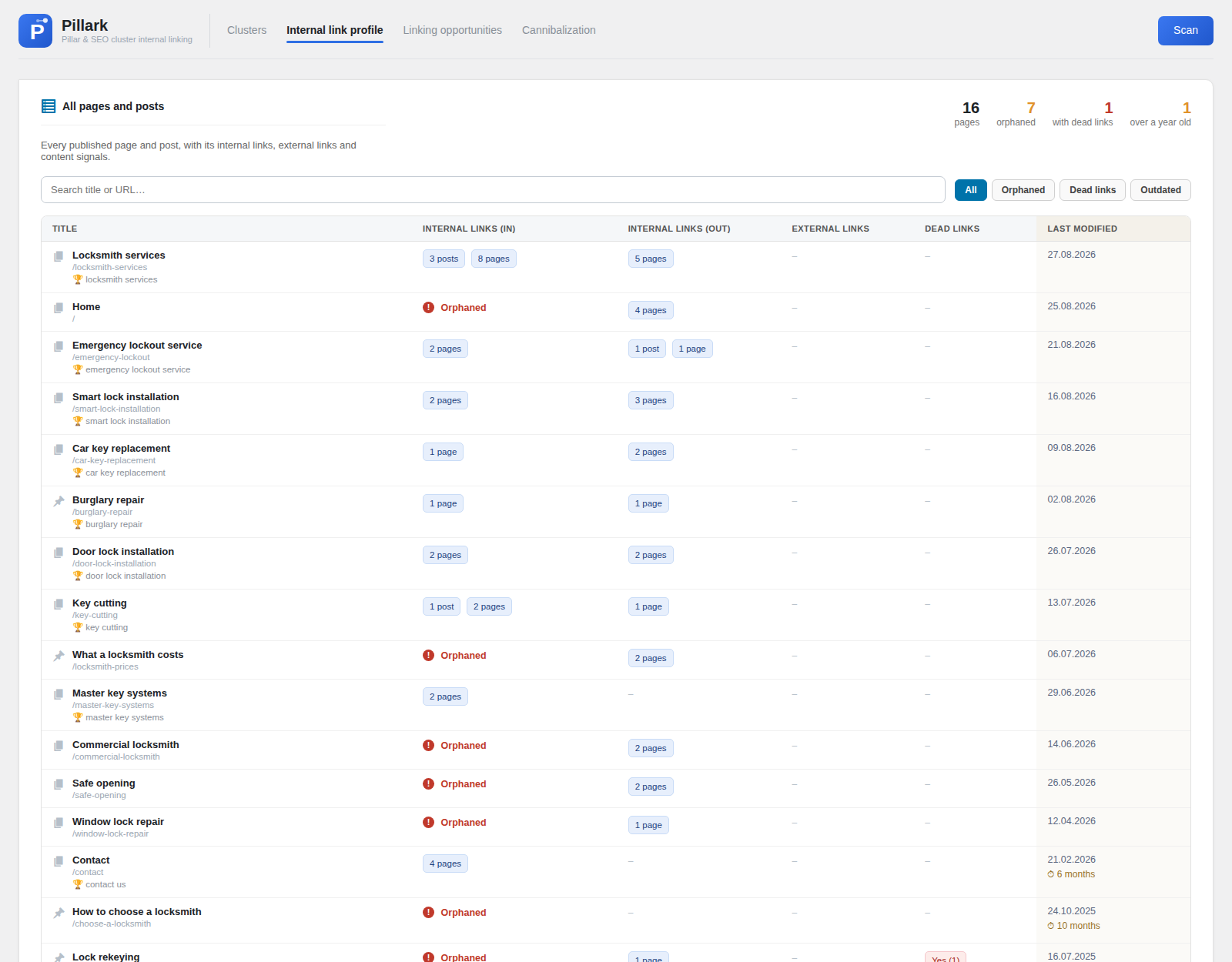
It reads every internal link on the site in one pass and lists every published page and post with the number of pages linking in, the number it links out to, and a marker on the ones with no incoming links at all. There is a filter for orphans, so the list you need is one click from the dashboard. The plugin is free on WordPress.org.
What to do with each one
Finding orphan pages is the easy half. The useful question is what each one is for, and the answer is usually one of four.
Link to it
If the page is worth keeping and worth ranking, give it links from pages that are related to it. Two or three good links from relevant articles are worth more than a menu item. Use anchor text that describes the destination, so the link tells both the reader and the search engine what they will get.
The best candidates are pages that already mention the target by name without linking. The sentence is written and the context is right, so the edit takes seconds.
Merge it
If the page overlaps with another page, the orphan is often the weaker of the two. Move anything worth keeping into the stronger page and redirect the orphan to it with a 301. This is common with old service pages, where two pages have been quietly competing for the same search for years.
Redirect or remove it
Campaign landing pages that have served their purpose can be redirected to the relevant service page. Pages with nothing worth keeping can be deleted, with a redirect if the URL ever had traffic or links pointing to it from other sites.
Deleting is fine. A site with fifty pages that all matter is stronger than a site with two hundred where a hundred and fifty are unused.
Leave it deliberately
Some orphan pages should stay orphans. A thank-you page after a form submission, a page used only in an ad campaign, a printable price list linked from a PDF. These pages have a job that does not involve search. Note them, exclude them from the list mentally, and stop counting them as a problem.
Where to start
If you have never checked, expect the number to be higher than you think, and do not try to fix all of them. Sort the list by which pages you would most like to rank, take the top five, and give each one two or three links from pages that already talk about the same subject.
Then check again in a month. Orphan pages are not a problem you solve once. They appear every time a page is rewritten, a menu is rebuilt or a campaign ends, which is why it helps to have the answer somewhere you will actually see it.